
Forecasting Customer Demand: A Key Factor in Inventory Optimization
3 min read StaffCloud
The report scrutinizes various aspects, including customer demand and additional variables, to estimate the projected customer demand on a weekly basis in the immediate upcoming period.
These findings are valuable for formulating inventory strategies and anticipating forthcoming Purchase Orders, with the aim of minimizing product unavailability periods on the website.
It is important to note that this analysis provides a forecast and does not assure precise future demand. Additionally, it should be emphasized that it does not serve as a Purchase Order forecast but represents just one of the variables utilized to generate Purchase Orders.
How do you access the Forecasting Dashboard on Vendor Central?
- Log in to your Vendor Central account using your credentials.
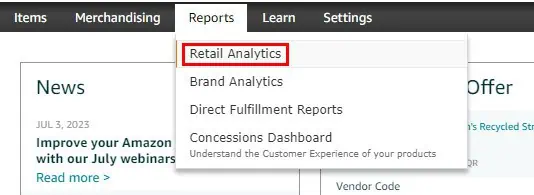
- Once logged in, navigate to the "Reports" tab or a similar section.
- Click "Retail Analytics"
- Click "Forecasting"

The dashboard provides a number of different metrics, including:
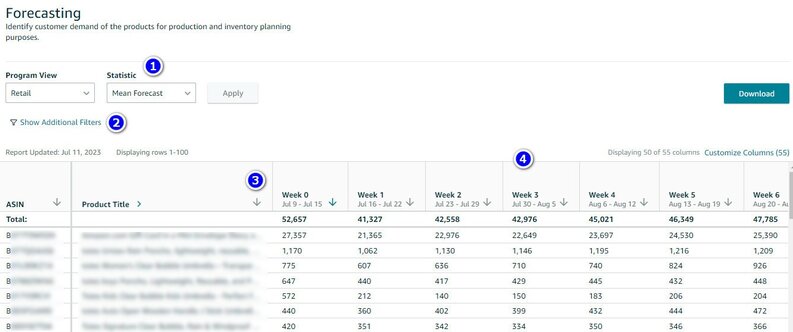
1. STATISTIC
P-levels: Modify the desired P-levels you wish to examine using this feature. P-levels indicate the probability of meeting customer demand at different stock levels. For instance, if a P70 forecast indicates 400 units, it means there is a 70% chance that actual customer demand will be 400 units or lower. This also implies a 30% probability that customer demand will exceed 400 units. Lower P-values signify a more conservative estimate, while higher P-values indicate an optimistic assessment of customer demand.
Mean: The best estimate for customer demand, known as the mean forecast, is provided by Amazon.
2. ADDITIONAL FILTERS
By selecting this option, you can filter the results for a specific ASIN (Amazon Standard Identification Number) or multiple ASINs (up to 100).
3. SORTING
To sort the results, click the arrow icon in any column. For instance, sorting the results by the Product Title column will arrange them alphabetically based on the product title. Clicking the arrow again will reverse the sort order.
4. WEEKLY FORECAST
These columns display the projected customer demand for each product for up to 25 weeks in the future.
LET'S TAKE AN EXAMPLE
Let's explore a practical example to demonstrate the type of information you can gather using this dashboard.
Suppose we have scheduled a promotional campaign that will commence in 7 weeks. Using the forecasting report, we can evaluate the estimated customer demand and adequately prepare our stock.
Follow these steps:
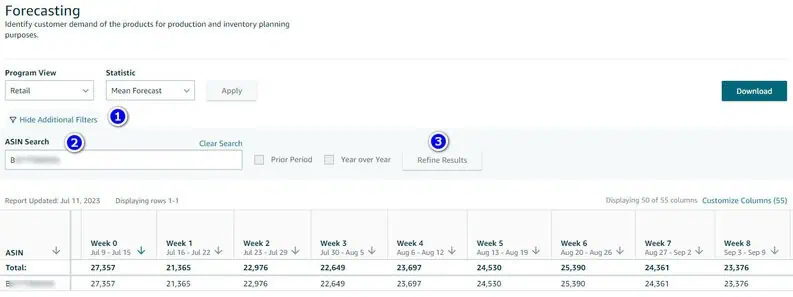
- Click the "Show additional filters" button to expand the menu.
- Enter the ASINs corresponding to the desired products. You have the flexibility to enter multiple ASINs, with a limit of up to 100 entries.
- Click the "Refine Results" button.
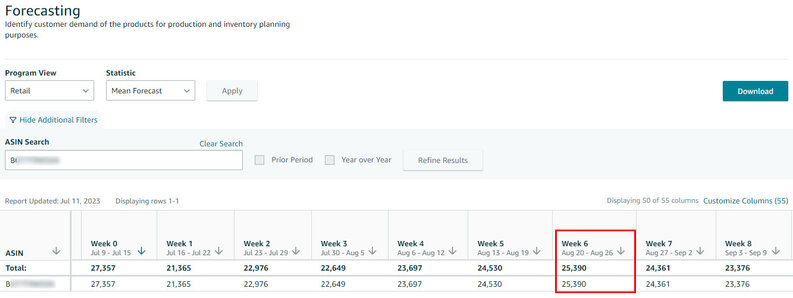
You now have the opportunity to analyze the anticipated customer demand for the forthcoming weeks. During week 7, which aligns with the promotional period, Amazon's advanced systems evaluated the potential impact of the promotion using a comprehensive range of data points, including historical records, brand recognition, promotional parameters, and various other factors. The projected average for that specific week is 25,390 units, significantly surpassing the average for other weeks.
This valuable information can be employed to manage your inventory effectively and, in conjunction with additional insights (such as the current available inventory in Amazon Fulfillment Centers, accessible through the Inventory Dashboard), proactively estimate the quantity required for future purchase orders.
Experience the unparalleled support of StaffCloud.net for all your backend and online retail needs. Our skilled professionals excel in a range of essential duties, such as data entry, inventory management, customer support, and other administrative tasks. Trust us to optimize your business processes and drive you toward success. Connect with StaffCloud now and witness the transformative impact of a dependable collaborator.
Related services
- eCommerce Order & Fulfillment Operations From purchase order to tracking number, across every channel you sell on. Explore service
- eCommerce Amazon Seller & Vendor Central Management Seller and Vendor Central run day to day — listings, content, ads, cases and claims. Explore service
- BPO Data Entry & Document Processing Data entry, OCR and the document work that keeps records usable. Explore service
More articles in Amazon
-
 21 July 2025
How to Add ‘There Is a Newer Version of This Item’ Tag to your Amazon Listing?
If you’ve ever browsed Amazon, you might have come across a subtle yet powerful message above the product title that say
21 July 2025
How to Add ‘There Is a Newer Version of This Item’ Tag to your Amazon Listing?
If you’ve ever browsed Amazon, you might have come across a subtle yet powerful message above the product title that say
-
 21 May 2025
Amazon FBA vs. FBM: What’s the Difference and Which Fulfillment Method is Right for You?
Selling on Amazon presents a tremendous opportunity for business growth, but your success heavily depends on choosing th
21 May 2025
Amazon FBA vs. FBM: What’s the Difference and Which Fulfillment Method is Right for You?
Selling on Amazon presents a tremendous opportunity for business growth, but your success heavily depends on choosing th
-
 23 November 2024
How to use Automate Pricing Feature on Amazon Seller Central?
Automate Pricing is a powerful tool offered by Amazon Seller Central to help sellers dynamically adjust their prices in
23 November 2024
How to use Automate Pricing Feature on Amazon Seller Central?
Automate Pricing is a powerful tool offered by Amazon Seller Central to help sellers dynamically adjust their prices in