

How to Create Financial Journal Entries on Exact Online?
2 min read StaffCloud
Exact Online, is a cloud-based enterprise resource planning (ERP) and accounting solution tailored for small to medium-sized enterprises. It's engineered to streamline business processes in areas like finance, customer relationship management (CRM), manufacturing, and wholesale distribution, making it a key ally for business owners focused on accuracy and growth.
Exact Online - Designed for Growth
By offering scalability through add-ons and API integrations, Exact Online supports evolving needs. Whether expanding to new markets or onboarding complex inventory processes, it adapts without disrupting the existing infrastructure.
What are the different types of financial entries that can be created?
- Bank and Cash Entries: These are used to register cash that’s received for payment or used to pay for goods and services. Bank entries are for purchases and sales done using bank transactions.
- Sales and Purchase Entries: These entries are created to register the invoices for your sales and purchase transactions.
- General Journal Entries: This type is used for any other entries that cannot be created in the other types of journals.
- Opening Balance Entries: You can create entries for the company's opening balance.
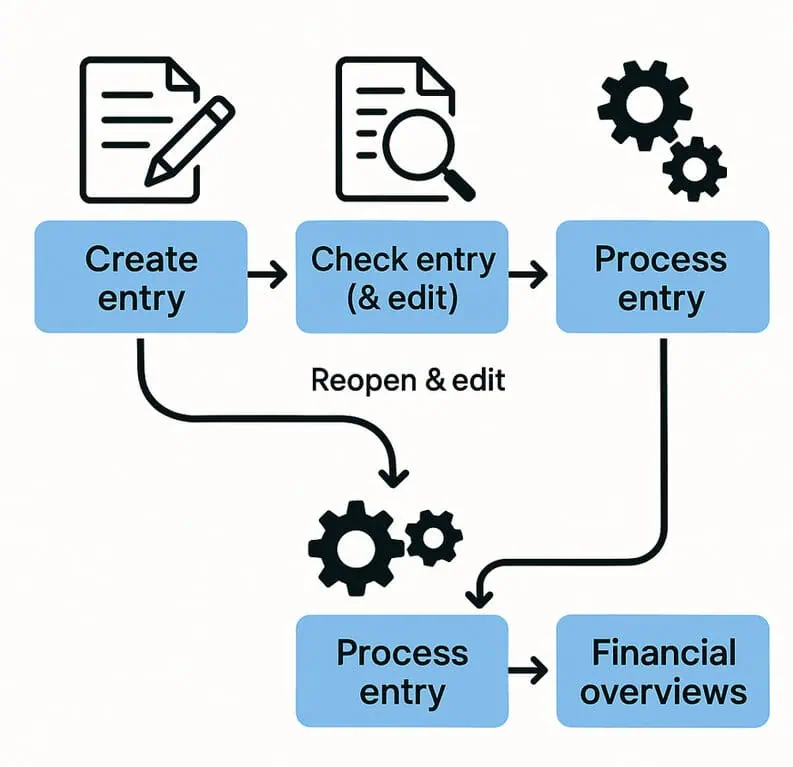
With Exact Online, all financial activities can be recorded with high accuracy. To start, pick a suitable journal that corresponds with the kind of transaction being recorded. Subsequently, the system registers these entries within the corresponding General Ledger (G/L) accounts. For accuracy, entries can be reviewed, reopened, and modified if needed before undergoing their final processing.
Here's how to create a financial journal entry
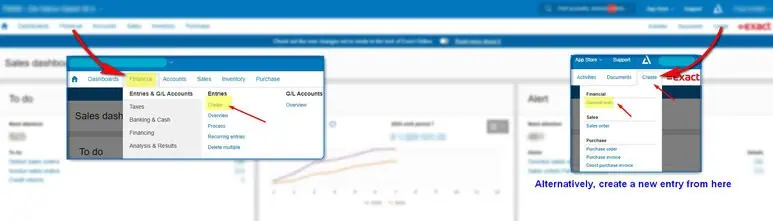
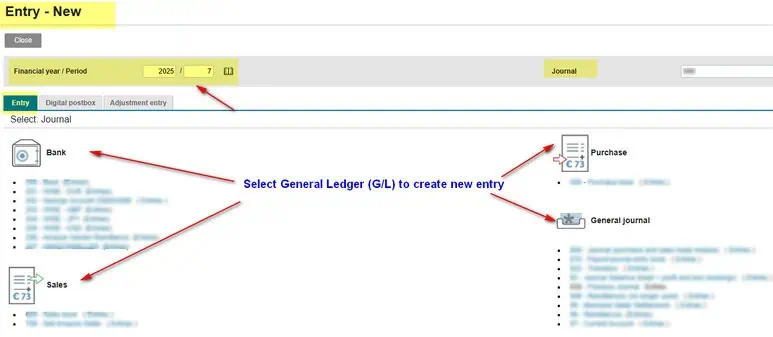
- Go to Financial > Entries & G/L Accounts > Entries > Create and select the journal in which you want to create an entry.
- Select a G/L to create an entry – Sales/ Purchase/ General Journal
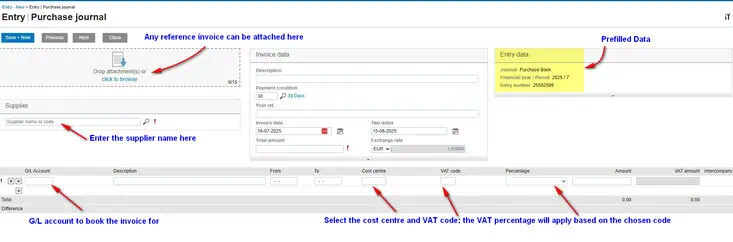
- The Entry no. and Financial year / Period will be prefilled. Enter the relevant information for the entry. #Add invoice attachments via upload: Go to the attachment section, select or drag a file, click Add. Changes save automatically.
- Depending on the type of entry you are creating (Bank & Cash, Sales & Purchase, or General journal), fill in the necessary details: Bank & Cash entries: You can enter one Amount, or you can enter the Cash in and Cash out. Sales & Purchase entries: Make sure to enter the Customer, Payment condition, and Total amount. General journal entries: You can create a reverse entry of an existing entry or copy an entry for frequent transactions.
- Click Save + New to save your entry.
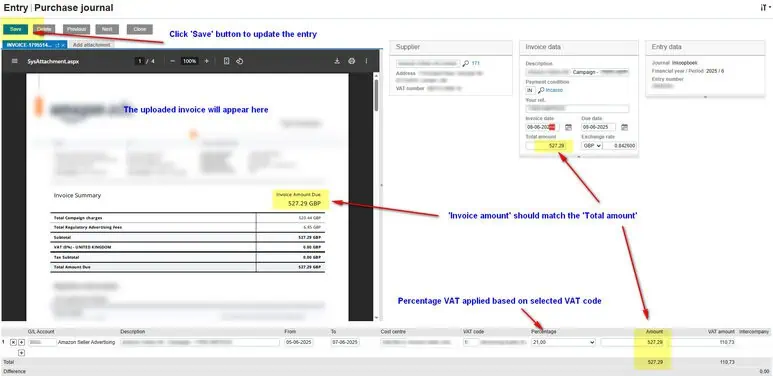
You can easily adjust your entries in Exact Online before they're fully processed.
While Exact Online is a powerful tool for managing your finances, manually creating and reconciling entries especially with complex payroll, project costing, or large transaction volumes can eat up a lot of time and lead to errors. This is precisely where Staffcloud becomes your essential strategic partner.
Looking to enhance your financial operations? Let's connect! Staffcloud can pave the way for a more efficient and precise financial future for your business.
Related services
- eCommerce Order & Fulfillment Operations From purchase order to tracking number, across every channel you sell on. Explore service
- Sales & CRM CRM Operations & Data Intelligence CRM hygiene, enrichment and the reporting your sales lead will actually open. Explore service
- eCommerce Retail Systems & EDI Integrations Retailer portals, EDI, ERP and the disputes that come out of them. Explore service
More articles in SaaS & Finance
-
 29 July 2025
How to Process Orders Using Goflow? A Step-by-Step Guide for E-Commerce Sellers
Managing orders efficiently is the backbone of any successful e-commerce business. Whether you're selling on Amazon, Wal
29 July 2025
How to Process Orders Using Goflow? A Step-by-Step Guide for E-Commerce Sellers
Managing orders efficiently is the backbone of any successful e-commerce business. Whether you're selling on Amazon, Wal
-
 22 July 2025
How to Streamline Multichannel Operations with Rithum? All-in-One E-Commerce Solution for Brands & Retailers
Begin by logging into the Rithum Order Stream dashboard. This is where you’ll monitor file availability and download pac
22 July 2025
How to Streamline Multichannel Operations with Rithum? All-in-One E-Commerce Solution for Brands & Retailers
Begin by logging into the Rithum Order Stream dashboard. This is where you’ll monitor file availability and download pac
-
 18 July 2025
How to Manage Invoicing Efficiently with Sage 100?
In the modern business landscape, efficiency, visibility, and control are critical for sustainable growth. That’s where
18 July 2025
How to Manage Invoicing Efficiently with Sage 100?
In the modern business landscape, efficiency, visibility, and control are critical for sustainable growth. That’s where